Whether you are checking one for the first time or verifying somebody else’s, knowing what a bank statement looks like helps you read it quickly and spot when something is wrong.
This guide walks through the standard UK layout, how it differs between banks and formats, and the signs that a statement has been altered.
Key Takeaways
- Every UK statement has the same four blocks: header, summary, transactions and footer.
- Layouts differ between banks, but the information is always the same.
- A PDF from your bank is the accepted format; app screenshots are not.
- Genuine statements carry your full name, address, sort code and account number.
- Misaligned columns and inconsistent fonts are the usual signs of an altered file.
What a Bank Statement Looks Like: The Standard UK Layout
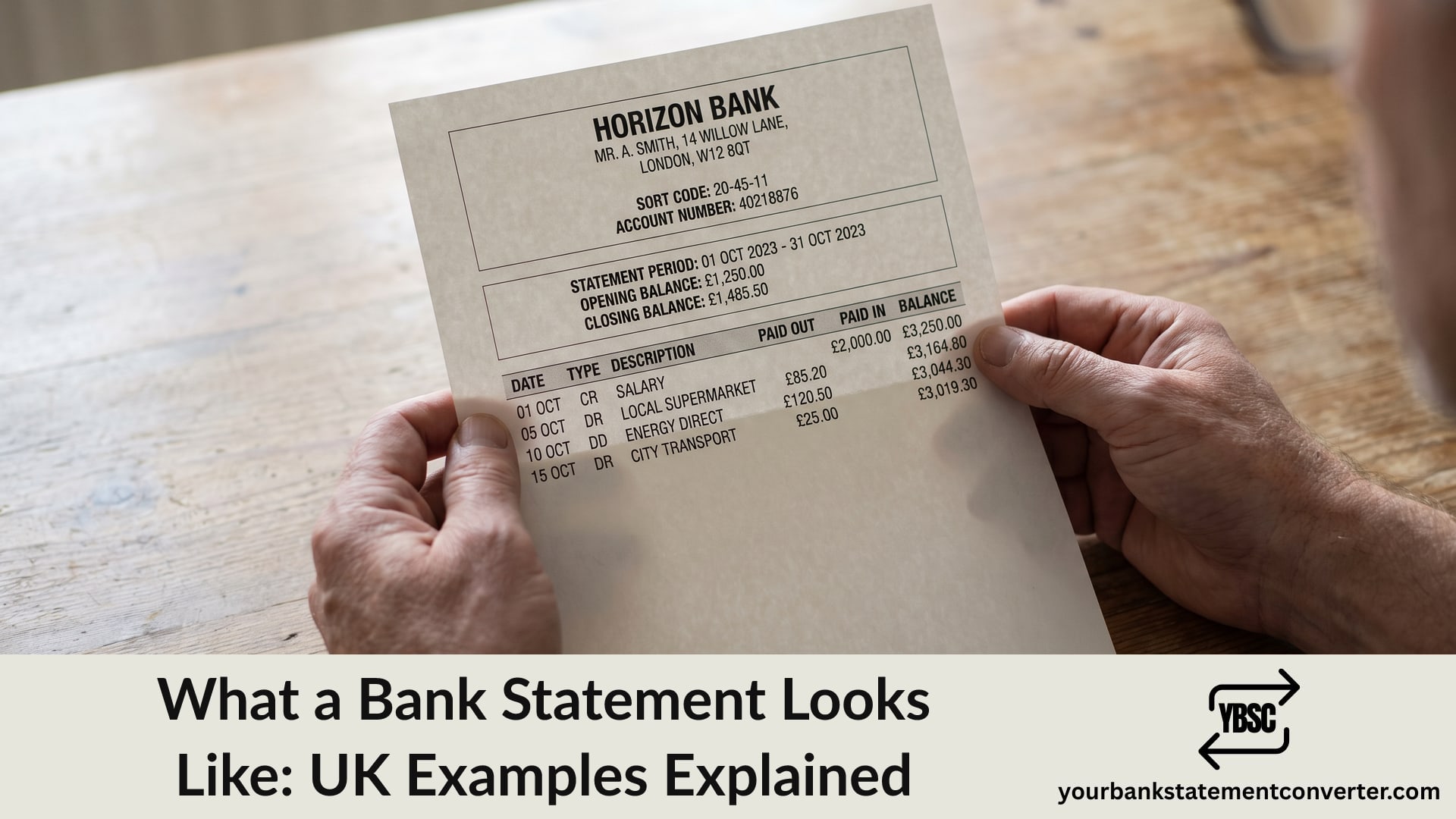
Read any statement in four parts and it becomes predictable.
The header sits at the top. It carries your name and address, the bank’s name, your sort code and account number, often an IBAN, and the statement number.
Next comes the summary, giving the statement period, the opening and closing balances, and totals paid in and out.
Below that, the transaction table takes up most of the page, one row per movement of money.
Finally, the footer carries the bank’s registered details and regulatory information.
Our guide to what is on a bank statement covers each field in detail.
What the Transaction Table Looks Like
This is the part people mean when they picture a statement.
Columns vary slightly by bank. Expect some combination of these:
- Date, when the transaction cleared
- Type, a short code such as DD, STO, BGC or ATM
- Description, naming the party involved
- Paid out and Paid in, or one Amount column with a minus sign
- Balance, the running total after that row
Some banks print DR or CR beside figures rather than using separate columns. Our guide to debits and credits explains both conventions.
How Statements Differ Between Banks
The information is standard; the presentation is not.
High street banks tend towards dense multi-column tables, often several pages for a busy month.
Digital banks produce cleaner, more spacious layouts, sometimes with a single amount column.
Building societies often use a passbook-style layout with fewer columns.
Business accounts add references and payment details that personal statements omit.
None of that changes what the document proves. Lenders and landlords read any of them the same way.
Paper, PDF and App: Three Different Things
The distinction matters, because only some versions are accepted as evidence.
Paper statements arrive by post, carry the bank’s letterhead, and work everywhere.
PDF statements downloaded from online banking match paper ones in content and carry the same weight. Lenders mean these when they ask for statements.
App transaction lists are not statements. They show recent activity without the header, the period or the balances, so recipients reject screenshots.
If you are asked for statements, download the official PDF rather than screenshotting your app. Our guide to what bank statements are needed for a mortgage covers the requirements.
How to Spot a Fake or Altered Statement
Landlords, employers and lenders check for this, and the tells are consistent.
- Misaligned columns, where an edited figure sits slightly off the grid
- Inconsistent fonts or spacing within the same table
- A balance column that does not add up line by line
- Missing pages, or page numbers that skip
- A statement period that does not run consecutively with the next one
- Rounded figures everywhere, since real spending rarely produces them
The running balance gives the strongest check. Every row should equal the previous balance plus or minus that transaction, so a single edited amount breaks the chain from that point down.
Reading a Statement Faster
Long statements resist scanning, particularly when you are hunting one recurring payment across several months.
Our bank statement converter turns PDF statements into clean, searchable spreadsheets. Sort by amount, filter by merchant, or check the balance column arithmetic in seconds rather than reading down a page.
Conclusion
To sum up, what a bank statement looks like is consistent across UK banks even when the styling differs: a header identifying the account, a summary giving the period and balances, a transaction table carrying the detail, and a regulatory footer. Use the bank’s official PDF when a statement is requested, since app screenshots lack the header and balances that make the document proof of anything.
FAQ
1.What does a bank statement look like?
It has four parts: a header with your name, address, sort code and account number; a summary showing the period and balances; a transaction table listing each movement of money; and a footer with the bank’s regulatory details.
2.Do all UK banks use the same layout?
No, though they all show the same information. High street banks use denser tables, digital banks cleaner layouts, and building societies often a passbook style.
3.Is a screenshot from my banking app a bank statement?
No. App transaction lists lack the header, statement period and balances, which is why lenders and landlords reject them. Download the official PDF instead.
4.What should a genuine bank statement include?
Your full name and address, the bank’s name, your sort code and account number, the statement period, opening and closing balances, and a transaction table with a running balance.
5.How can you tell if a bank statement is fake?
Check that the running balance adds up line by line, look for misaligned columns or inconsistent fonts, and confirm the pages and statement periods run consecutively without gaps.
6.Are PDF statements as valid as paper ones?
Yes. A PDF downloaded from your bank contains the same information and is accepted by lenders, landlords and employers, provided it is unaltered and complete.