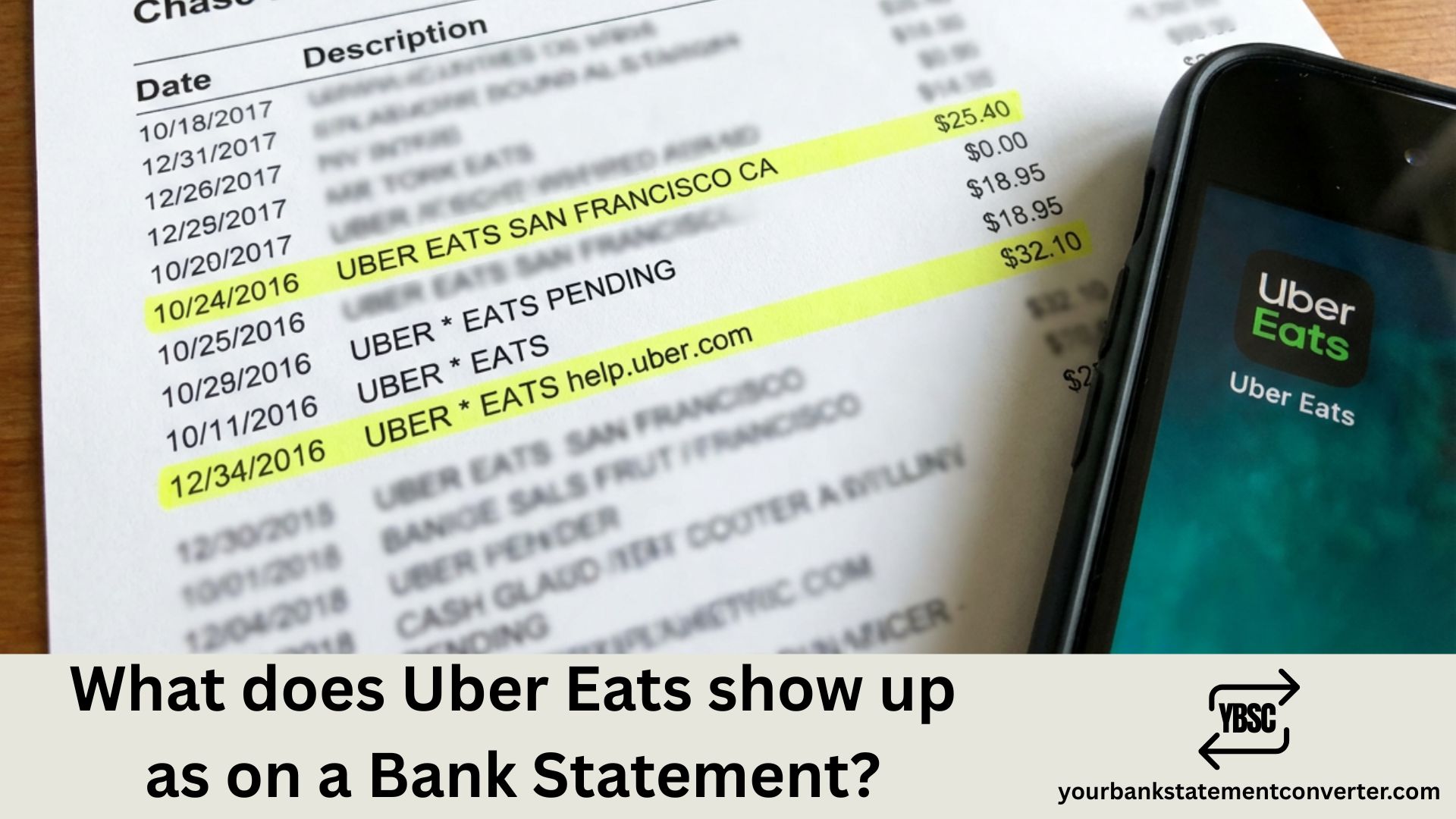
Uber Eats transactions typically appear on your bank statement as *“UBER EATS”**, “UBEREATS.COM”, or “UBER *EATS HELP.UBER.COM”. The format varies slightly depending on your bank and card provider.
Key Takeaways
- Uber Eats bills under Uber, so the restaurant never appears.
- The descriptor can look almost identical to an Uber ride, which causes most confusion.
- A pre-authorisation hold often sits alongside the final charge.
- Uber One is a membership that bills monthly regardless of orders.
- Tips adjusted after delivery generate a separate entry.
What Does Uber Eats Show Up as on the Bank Statement?
When you order food through Uber Eats, the charge displays in several common formats:
Standard purchase formats:
- UBER* EATS
- UBER *EATS
- UBEREATS.COM
- UBER* EATS HELP.UBER.COM
- UBER EATS [CITY NAME]
For pending or temporary holds:
- UBER* PENDING
- UBER EATS TEMP AUTH
For tips added later:
- UBER* EATS (separate charge)
- UBER *TIP
You might notice multiple charges from a single order. This happens because Uber Eats sometimes processes the food cost, delivery fee, and tip as separate transactions.
Why You Might See Multiple Uber Eats Charges
Uber Eats uses authorization holds when you place an order. The initial hold covers the estimated total, but the final charge may differ based on:
- Driver tips added after delivery
- Price adjustments from the restaurant
- Promotional credits applied later
- Service fee updates based on final order total
The pending authorization typically drops off within 3-5 business days, leaving only the final charge.
How to Identify Legitimate Uber Eats Charges
- Open your Uber Eats app and tap “Orders” to view history
- Match the date and amount with your bank statement
- Check your email for Uber Eats receipts
- Look for the “UBER*” prefix which confirms it’s from Uber
Uber Eats vs. Uber Rides on Bank Statements
Both services come from the same company but display differently:
| Service | Bank Statement Format |
|---|---|
| Uber Eats | UBER* EATS, UBEREATS.COM |
| Uber Rides | UBER* TRIP, UBER BV |
Managing multiple food delivery expenses across your bank statements?
Our free online bank statement converter lets you convert PDF bank statements into Excel or CSV formats instantly. Easily filter and categorize all your Uber Eats transactions for expense reports, budgeting, or tax purposes—without manual data entry.
FAQs
Most confusing entries come down to a code or a company name you have not met before. Our guide to what the abbreviations mean covers the codes, and what is on a bank statement explains the rest of the layout.
Telling a Food Order From a Ride
This is the distinction people actually need, and the descriptors barely help.
Both services bill under the Uber umbrella, and some banks show little more than UBER with a reference. Where the text is longer you may see UBER *EATS for food and UBER *TRIP for a journey, which is the clearest signal available.
Two practical tests work better than the descriptor:
- The time of day. Evening charges skew towards food; commuting hours skew towards rides.
- The amount. Food orders usually exceed a short ride, though neither is conclusive alone.
Our guide to Uber Trip Help covers the ride-side descriptor in detail.
Why the Charge Differs From the Order Total
Several things move the final figure.
A pre-authorisation hold is placed when you order, reserving an amount before the real charge lands. Both can appear at once, which looks like a double charge but is one order settling.
Tips added or adjusted after delivery bill separately, producing a second smaller entry.
Substitutions and unavailable items change the total after you have checked out.
Service and delivery fees sit on top of the food price and vary by order.
The Membership Charge
A steady monthly amount with no matching order is usually Uber One, the membership reducing delivery fees across both Eats and rides.
It renews automatically whether or not you order, which is why it surfaces in months when you did not use the app at all.
How to Identify a Charge
Open the Uber or Uber Eats app and check your order history, which lists each order with its full breakdown.
Check both services, since a charge missing from Eats may sit in your ride history.
Look for pending holds before concluding you were charged twice.
Ask who else uses the card, because household orders bill to whichever card is saved.
Where nothing matches, contact Uber through the app before your bank, then report it as unrecognised if Uber cannot trace it.
Totalling Delivery and Ride Spending
Uber charges accumulate across food, rides, fees, tips and a membership, all under similar descriptors.
Our bank statement converter turns PDF statements into clean, searchable spreadsheets. Filter for Uber and the entries separate by amount and date, so food and rides can finally be totalled apart.
Why does my bank statement show two charges from Uber Eats?
This commonly happens when tips are processed separately from the main order, or when an authorization hold appears alongside the final charge. The hold will disappear within a few days.
What does “UBER EATS HELP.UBER.COM” mean on my statement?
This is the standard Uber Eats transaction format that includes their help website URL. It’s a legitimate charge from your food order.
Why is my Uber Eats charge different from my receipt?
The difference usually comes from tips added post-delivery, promotional credits being applied, or price adjustments made by the restaurant after order confirmation.
How do I dispute an Uber Eats charge I don’t recognize?
First check your order history in the Uber Eats app. If you still don’t recognize it, contact Uber support through the app or visit help.uber.com. You can also dispute directly with your bank.
Does Uber Eats charge appear immediately on bank statements?
A pending authorization appears almost immediately, but the final posted charge typically takes 1-3 business days to reflect on your statement.
Can someone else’s Uber Eats order appear on my statement?
Yes, if your card is saved on a shared account or if someone has access to your payment method. Check the delivery address in your Uber Eats order history to verify.
Why does Uber Eats show a different city on my bank statement?
Uber processes payments through various regional offices. The city shown may be Uber’s billing location rather than where you ordered from.