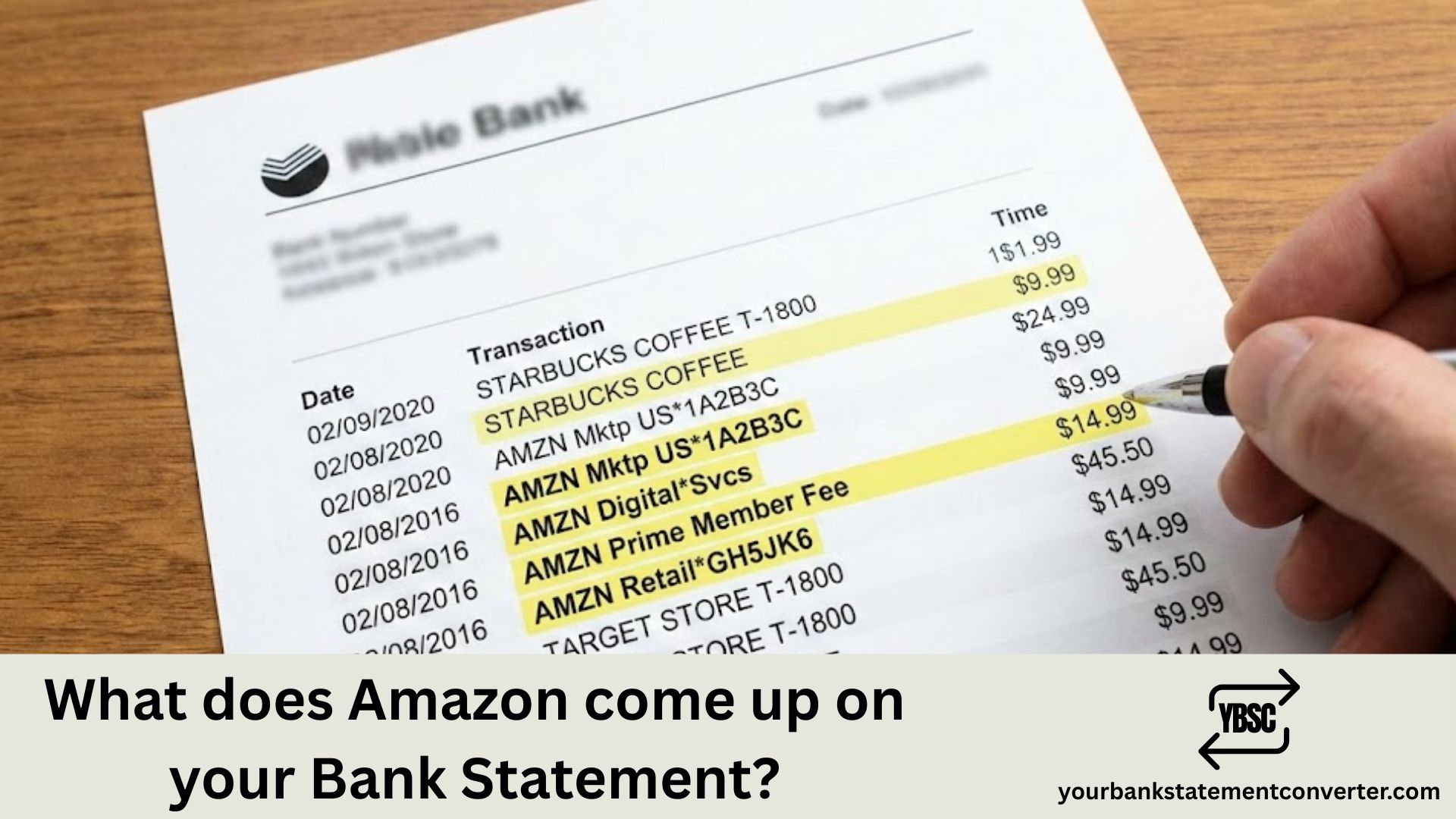
If you’ve ever spotted an unfamiliar charge and wondered “what does Amazon come up on your bank statement,” you’re not alone. Amazon transactions can appear under various names depending on the type of purchase from standard orders to Prime memberships, digital downloads, and third-party marketplace sales. Understanding these different descriptors helps you quickly identify legitimate charges, spot unauthorized transactions, and keep your finances organized.
Key Takeaways
- Amazon uses several different descriptors, so one company can produce entries that look unrelated.
AMZN MKTP,AMAZON PMTSandAMZN DIGITALall point back to the same account.- Your statement never shows what you bought, only that Amazon took the money.
- A small recurring charge with no matching order is usually a subscription renewal.
- Your Amazon order history, not your bank, is where a charge gets identified.
What Does Amazon Show Up As on Your Bank Statement?
Common Amazon charges you’ll see on your statement:
- AMAZON.COM – Standard marketplace purchases
- AMZN.COM/BILL or AMZN.COM/BILLWA – General Amazon orders (WA refers to their Washington state headquarters)
- AMAZON PRIME or AMZN PRIME – Monthly or annual Prime membership fees
- AMAZON DIGITAL or AMZN DIGITAL – Kindle books, music, apps, or digital content
- AMAZON MKTPLACE – Third-party seller purchases on Amazon’s marketplace
- AWS or AMAZON WEB SERVICES – Cloud computing services charges
- WHOLE FOODS MARKET – Purchases from Amazon-owned Whole Foods stores
- AUDIBLE – Audiobook subscription or purchases
Why Amazon charges can be confusing:
Amazon often splits orders into multiple shipments, meaning one order might generate several separate charges on your statement. Additionally, pending authorizations may appear before the final charge posts, sometimes causing temporary duplicate entries.
Tip: If you’re trying to reconcile Amazon purchases with your bank records, log into your Amazon account and check your order history under “Your Orders” to match transactions.
Need to organize your bank statements for expense tracking or reconciliation? Converting your PDF bank statements to Excel makes it much easier to search, filter, and categorize transactions like Amazon purchases. Try our free online bank statement converter to instantly convert your statements into editable spreadsheet format—perfect for tracking subscriptions, identifying recurring charges, and managing your finances more efficiently.
Why One Order Can Produce Several Charges
This surprises people more than the descriptor names do.
Amazon charges when an item ships, not when you order. A basket containing three items dispatched separately therefore produces three charges on three dates, none of which matches the order total you saw at checkout.
Add a tip, a delivery fee, or a post-delivery adjustment for a missing item, and the figures drift further from the number you remember.
What Your Bank Cannot Tell You
A statement records the merchant, the date and the amount. It never receives an itemised basket.
That matters more with Amazon than with most retailers, because Amazon sells almost everything. A £14.99 charge from a supermarket is easy to place. The same amount from Amazon could be a book, a phone case, a film rental or a subscription renewal.
Our guide to whether a bank statement shows what you bought covers the limits in full, and Amazon PMTS explains that specific descriptor.
How to Trace an Amazon Charge in Under a Minute
Take these in order.
Open Your Orders in your Amazon account and filter by date. This resolves most charges immediately.
Check Your Payments, which lists transactions not tied to a physical order.
Look at Memberships and Subscriptions if nothing in the order history matches. Annual renewals catch people out because twelve months have passed.
Check other profiles and devices. Household members and in-app purchases bill to the same card.
Compare against split shipments, since one order charged in parts explains most “extra” entries.
Where nothing matches, contact Amazon before your bank. They can identify a transaction from the amount and date. Only if Amazon cannot trace it should you treat it as unrecognised and report it to your bank, promptly, because card disputes carry time limits.
Totalling What Amazon Costs You in a Year
Individual charges are small enough to ignore. The annual figure across orders, subscriptions and digital purchases is the one that surprises people, and it is invisible when you read one month at a time.
Our bank statement converter turns PDF statements into clean, searchable spreadsheets. Filter the description column for Amazon and every entry across the year lines up with its date and amount, ready to total in one column.
FAQ
1.What does Amazon come up as on your bank statement?
Amazon appears under several descriptors, including AMAZON.COM, AMZN MKTP, AMZN.COM/BILL, AMAZON PRIME, AMAZON DIGITAL and AMAZON PMTS. All of them trace back to the same Amazon account.
2.Why does my statement not say what I bought from Amazon?
Banks only receive the merchant name, date and amount, never an itemised list. Because Amazon sells such a wide range, the amount alone rarely identifies the order.
3.Why are there several Amazon charges for one order?
Amazon charges when items ship rather than when you order. A basket dispatched in separate parcels produces a separate charge for each.
4.What is an Amazon charge with no matching order?
Usually a subscription renewal such as Prime, Kindle Unlimited, Audible or Music. Check the subscriptions section of your Amazon account.
5.Can someone else’s purchase appear on my statement?
Yes. Household members, children’s profiles and in-app purchases all bill to whichever card is on the account.
6.What should I do about an Amazon charge nobody can explain?
Contact Amazon first with the date and amount. If they cannot trace it to your account, report it to your bank as an unrecognised transaction without delay.