If you’re reviewing your bank statement and spotted an unfamiliar charge, you might be wondering what Netflix transactions look like. Understanding how streaming services appear on your statement helps you track subscriptions, identify unauthorized charges, and manage your monthly budget effectively.
What Does Netflix Show Up As on Bank Statement?
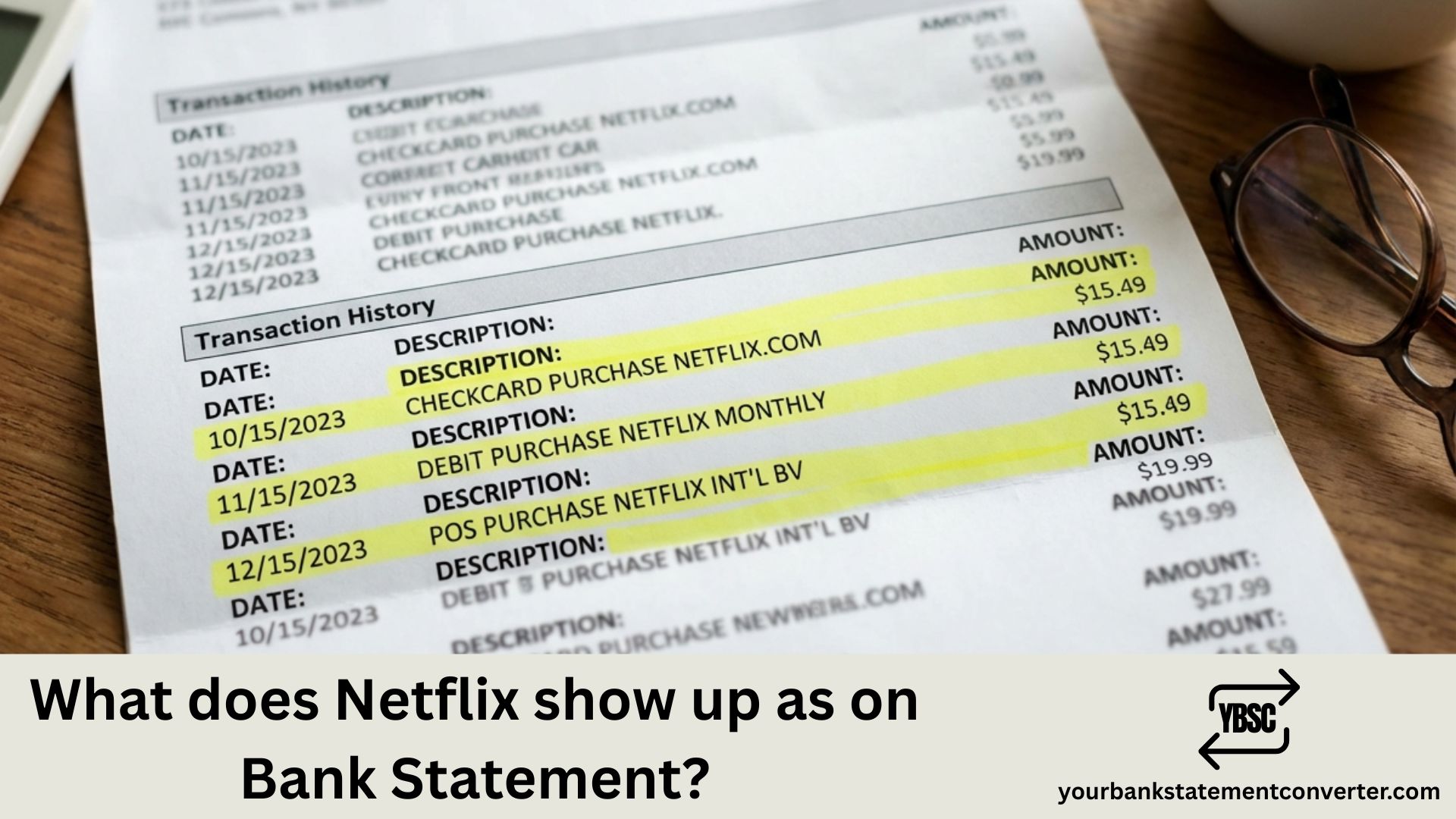
Netflix typically appears on your bank statement as “NETFLIX.COM” or “NETFLIX” followed by location details. The most common transaction descriptors include:
- NETFLIX.COM LOS GATOS CA – The standard descriptor showing Netflix’s headquarters location
- NETFLIX.COM – Simplified version without location
- NETFLIX INC – Corporate name variation
- NETFLIX AMSTERDAM or NETFLIX NETHERLANDS – For accounts billed through European entities
- NETFLIX.COM 866-579-7172 – Includes customer service number
The charge amount varies based on your subscription plan:
- Standard with Ads: ₹199/month (India) | $6.99/month (US)
- Standard: ₹649/month (India) | $15.49/month (US)
- Premium: ₹849/month (India) | $22.99/month (US)
Why Does Netflix Appear Differently on Some Statements?
Netflix charges may appear with slight variations depending on:
- Your bank’s formatting – Some banks truncate or modify merchant names
- Billing location – Netflix bills through different regional entities
- Currency conversion – International charges may show additional forex descriptors
- Payment method – Credit cards, debit cards, and UPI may display differently
How to Verify a Netflix Charge
If you’re unsure whether a charge is legitimate:
- Log into your Netflix account → Account → Billing Details
- Compare the charge date and amount with your statement
- Check if the billing matches your subscription plan
- Review authorized users on your account
Struggling to Track Subscriptions Across Multiple Bank Statements?
If you’re manually reviewing PDF bank statements to track recurring charges like Netflix, Spotify, or Amazon Prime, there’s a faster way.
Your Bank Statement Converter instantly transforms your PDF bank statements into organized Excel spreadsheets. This makes it simple to:
- ✅ Filter and search for specific merchants like Netflix
- ✅ Track all subscription charges in one view
- ✅ Identify duplicate or unauthorized transactions
- ✅ Categorize expenses for budgeting or tax purposes
Whether you’re a bookkeeper reconciling client accounts, a small business owner managing finances, or simply someone who wants better visibility into recurring charges — converting your statements to Excel saves hours of manual work.
👉 Try Your Bank Statement Converter Free
Frequently Asked Questions
What does Netflix charge look like on a credit card statement?
Netflix charges on credit card statements typically show as “NETFLIX.COM LOS GATOS CA” or simply “NETFLIX.COM” with the subscription amount. The exact format depends on your card issuer’s system.
Why is Netflix charging me when I don’t have an account?
If you see a Netflix charge but don’t have an account, someone may have used your card details. Contact your bank immediately to dispute the charge and request a new card. Also check if family members signed up using your payment method.
Does Netflix show the specific shows watched on bank statements?
No, Netflix bank statements only show the merchant name and subscription charge amount. They never display viewing history or specific content watched.
How do I stop Netflix charges on my bank statement?
To stop Netflix charges, cancel your subscription through Account → Cancel Membership in your Netflix app or website. Your access continues until the current billing period ends, and no further charges will appear.
What is the Netflix customer service number on bank statements?
Netflix sometimes includes their customer service number (866-579-7172 for US) in the transaction descriptor. You can also reach Netflix support through their Help Center at help.netflix.com.
Can I get a refund for Netflix charges?
Netflix may offer refunds for recent charges if you haven’t used the service. Contact Netflix support directly or request a chargeback through your bank for unauthorized transactions.
Why does my Netflix charge show a different country?
Netflix operates billing through regional entities. Charges showing Amsterdam, Netherlands, or Ireland are legitimate if you have an active subscription. This is standard for many international streaming services.



![What Is FSUK Payment on Bank Statement (Sports Direct Frasers Group)[2026]](https://yourbankstatementconverter.com/blog/wp-content/uploads/2026/03/What-Is-FSUK-Payment-on-Bank-Statement-Sports-Direct-Frasers-Group2026-300x169.jpg)
![What Does CR Mean on a Bank Statement (Credit Explained)[2026]](https://yourbankstatementconverter.com/blog/wp-content/uploads/2026/03/What-Does-CR-Mean-on-a-Bank-Statement-Credit-Explained2026-300x169.jpg)
![What Does BP Mean on a Bank Statement (Both Meanings Explained)[2026]](https://yourbankstatementconverter.com/blog/wp-content/uploads/2026/03/What-Does-BP-Mean-on-a-Bank-Statement-Both-Meanings-Explained2026-1-300x169.jpg)