Bank reconciliation is one of the most important financial habits for businesses and individuals alike. Whether you’re a small business owner, accountant, bookkeeper, or simply managing personal finances, reconciling your bank statement ensures your records are accurate, helps detect fraud early, and keeps your cash flow under control.
This step-by-step guide shows you exactly how to reconcile a bank statement quickly and efficiently—plus tools that can save you hours of manual work.
How do I reconcile a Bank Statement? [Step by Step]
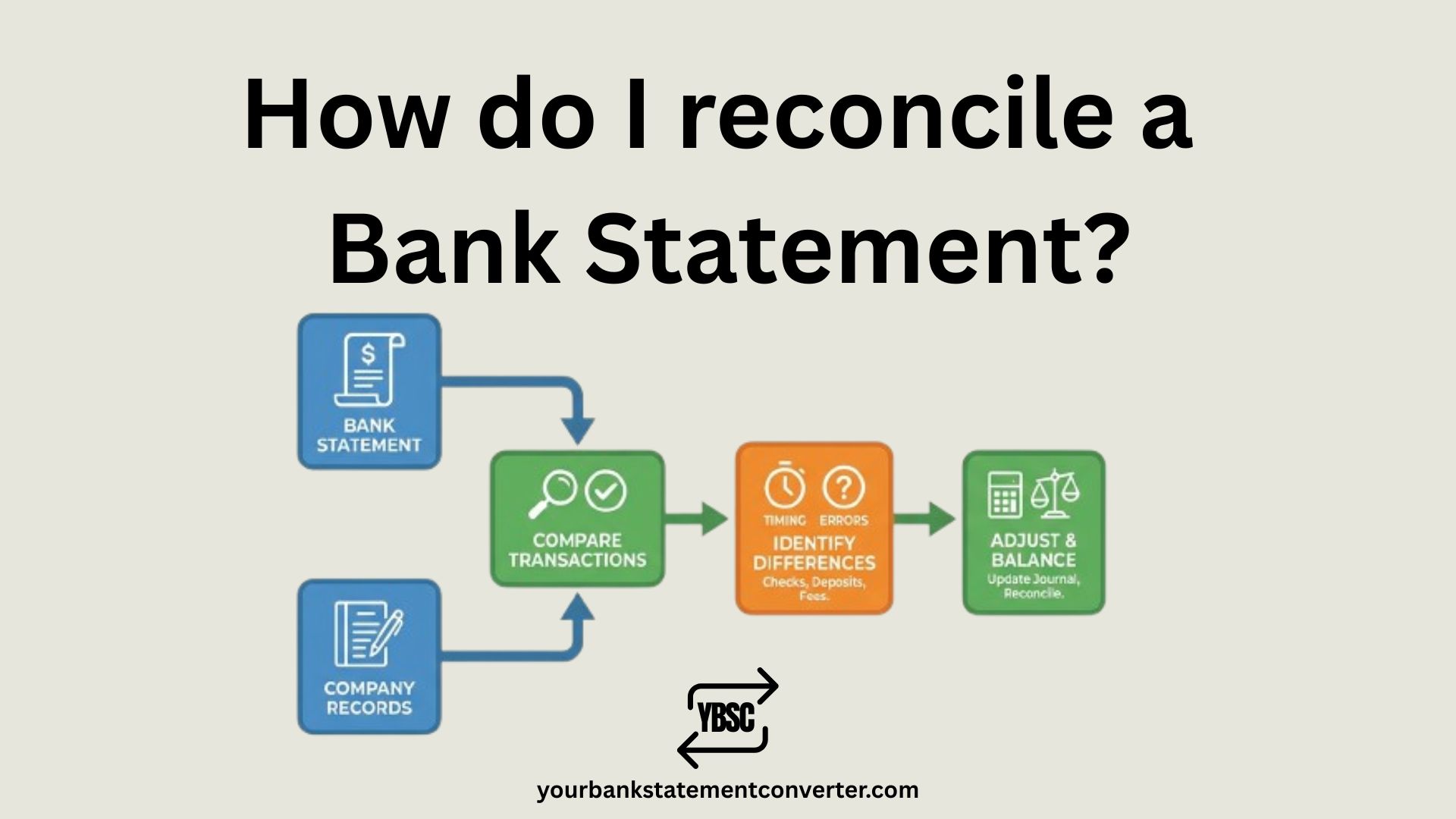
Bank reconciliation is the process of comparing your internal financial records (checkbook register, accounting software, or spreadsheet) with your bank statement to ensure every transaction matches. When done correctly, your adjusted book balance should equal your adjusted bank balance.
Here’s how to do it:
Step 1: Gather Your Documents
Before you begin, collect:
- Your bank statement for the reconciliation period (download from online banking)
- Your internal financial records (checkbook register, accounting software, or spreadsheet)
- Supporting documents like receipts, invoices, and deposit slips
Pro Tip: Create a dedicated folder to organize these documents—it saves hours when tracking down discrepancies.
Step 2: Compare Opening Balances
Start by comparing:
- The ending balance on your bank statement
- The ending balance in your accounting records or cash book
If these balances don’t match (which is common), you’ll need to identify the differences in the following steps.
Step 3: Match Transactions One by One
Go through each transaction systematically:
- Check deposits — Verify every deposit in your records appears on the bank statement with the correct amount and date.
- Check withdrawals and payments — Confirm every payment, check, or debit matches your records.
- Mark matched transactions — Use a highlighter or checkmark system to track verified transactions.
Best Practice: Use different colored highlighters for deposits (green) and withdrawals (red) to create a visual roadmap of your reconciliation progress.
Step 4: Identify Discrepancies
After matching, you’ll likely find differences. Common discrepancies include:
| Discrepancy Type | What It Means | How to Handle It |
|---|---|---|
| Deposits in Transit | Deposits you’ve recorded but the bank hasn’t processed yet | Add to bank balance |
| Outstanding Checks | Checks you’ve written but haven’t cleared the bank | Subtract from bank balance |
| Bank Fees & Charges | Service fees, wire fees, or overdraft charges deducted by the bank | Subtract from book balance |
| Interest Income | Interest earned on your account | Add to book balance |
| NSF Checks | Checks deposited that bounced due to insufficient funds | Subtract from book balance |
| Errors | Data entry mistakes, duplicate entries, or transposition errors | Correct in your records |
Step 5: Adjust Your Bank Balance
Adjust the bank statement balance for items recorded in your books but not yet reflected by the bank:
Adjusted Bank Balance = Bank Statement Ending Balance (+) Deposits in Transit (−) Outstanding Checks (±) Bank Errors
Step 6: Adjust Your Book Balance
Adjust your internal records balance for items on the bank statement not yet recorded in your books:
Adjusted Book Balance = Book Ending Balance (+) Interest Income (−) Bank Fees and Service Charges (−) NSF Checks (±) Recording Errors
Step 7: Verify Balances Match
After adjustments, your Adjusted Bank Balance should equal your Adjusted Book Balance.
If they match — congratulations, your reconciliation is complete!
If they don’t match:
- Recheck all calculations
- Look for transposition errors (e.g., $530 entered as $350)
- Verify all outstanding items are accounted for
- Check for duplicate or missing entries
Step 8: Record Journal Entries and Document
Once reconciled:
- Record adjusting journal entries for bank fees, interest income, NSF checks, and any errors discovered.
- Document the reconciliation with the date, preparer’s name, and any notes about resolved discrepancies.
- File your reconciliation statement with supporting documents for audit purposes.
Speed Up Reconciliation: Convert PDF Bank Statements to Excel
One of the biggest time-wasters in bank reconciliation is manually comparing PDF bank statements against your records. Copying transaction data row by row is tedious and error-prone.
YourBankStatementConverter.com eliminates this problem by instantly converting your PDF bank statements into clean, organized Excel or CSV files.
Why Finance Professionals Love This Tool:
- Works with any bank worldwide — Chase, Bank of America, Wells Fargo, HSBC, Barclays, Commonwealth Bank, TD Bank, and thousands more
- AI-powered accuracy — Extracts transaction dates, descriptions, amounts, and balances with precision
- Handles scanned statements — OCR technology converts even image-based PDFs
- Multiple currency support — Perfect for USD, GBP, EUR, AUD, CAD, and international reconciliations
- Ready-to-use output — Clean, structured data ready for QuickBooks, Xero, FreshBooks, or Excel analysis
- Secure & encrypted — Bank-level security protects your financial data
How It Helps with Reconciliation:
Once your bank statement is in Excel format, you can:
- Sort transactions by date, amount, or description
- Filter and search for specific payments or deposits
- Use Excel formulas to automatically match transactions
- Import directly into accounting software for automated reconciliation
👉 Try Your Bank Statement Converter Now — Upload your PDF and get structured Excel data in seconds.
Bank Reconciliation Example
Here’s a real-world example to illustrate the process:
ABC Company — Bank Reconciliation for March 2025
| Item | Amount |
|---|---|
| Bank Statement Ending Balance | $15,000 |
| (+) Deposits in Transit | $2,500 |
| (−) Outstanding Checks | $1,200 |
| Adjusted Bank Balance | $16,300 |
| Item | Amount |
|---|---|
| Book Ending Balance | $16,500 |
| (+) Interest Income | $50 |
| (−) Bank Service Fees | $75 |
| (−) NSF Check | $175 |
| Adjusted Book Balance | $16,300 |
✓ Both adjusted balances match at $16,300 — reconciliation complete!
How Often Should You Reconcile Bank Statements?
| Business Type | Recommended Frequency |
|---|---|
| High-volume businesses | Daily or weekly |
| Most small businesses | Monthly |
| Personal accounts | Monthly |
| Multiple bank accounts | Weekly |
Best Practice: Reconcile at least once per month during your financial close process. This gives you enough time to catch errors, outstanding checks, or fraudulent transactions before they become bigger problems.
Common Bank Reconciliation Mistakes to Avoid
- Skipping reconciliation — Even one missed month can snowball into major discrepancies.
- Not recording bank fees — Service charges are easy to overlook but throw off your balance.
- Ignoring timing differences — Deposits in transit and outstanding checks are normal—track them properly.
- Manual data entry errors — Typos and transposition errors (entering $98 as $89) are common culprits.
- Not investigating unrecognized transactions — Unknown charges could signal fraud—contact your bank immediately.
- Failing to document — Keep records of each reconciliation for audits and future reference.
Tools to Make Bank Reconciliation Easier
Accounting Software with Auto-Reconciliation
- QuickBooks
- Xero
- FreshBooks
- Wave
PDF to Excel Converters
YourBankStatementConverter.com — Instantly converts PDF bank statements to Excel or CSV for easier matching and analysis. Trusted by accountants, bookkeepers, and business owners in the USA, UK, Canada, Australia, and beyond.
Spreadsheet Templates
- Google Sheets bank reconciliation templates
- Microsoft Excel reconciliation worksheets
Frequently Asked Questions (FAQs)
What is bank reconciliation?
Bank reconciliation is the process of comparing your company’s internal financial records with your bank statement to ensure all transactions match. The goal is to verify that your recorded cash balance equals what the bank shows, after accounting for timing differences like outstanding checks and deposits in transit.
Why is bank reconciliation important?
Bank reconciliation helps detect errors, identify fraudulent transactions, ensure accurate financial reporting, manage cash flow effectively, and simplify tax filing and audits. It’s one of the most critical internal controls for any business.
How long does bank reconciliation take?
For a simple account with few transactions, reconciliation takes 15–30 minutes. For businesses with high transaction volumes or multiple accounts, it can take several hours. Using tools like YourBankStatementConverter.com to convert PDF statements to Excel can cut reconciliation time significantly.
What are deposits in transit?
Deposits in transit are amounts you’ve recorded in your books but the bank hasn’t processed yet. This commonly happens when deposits are made near month-end. During reconciliation, add deposits in transit to the bank balance.
What are outstanding checks?
Outstanding checks are checks you’ve written and recorded in your books, but the recipient hasn’t cashed yet, so they don’t appear on your bank statement. Subtract outstanding checks from the bank balance during reconciliation.
What should I do if my bank reconciliation doesn’t balance?
First, recheck all calculations and verify each transaction. Look for transposition errors, duplicate entries, or missing transactions. Confirm all outstanding items are properly accounted for. If the discrepancy remains, contact your bank—it could be a bank error or unauthorized transaction.
Can I reconcile my bank statement using Excel?
Yes! Many businesses use Excel or Google Sheets for bank reconciliation. The key is having your bank statement data in a format you can work with. Use YourBankStatementConverter.com to convert PDF bank statements to Excel instantly, making it easy to sort, filter, and match transactions.
What is an NSF check?
NSF stands for “Non-Sufficient Funds.” An NSF check is a check you deposited that bounced because the payer’s account didn’t have enough funds. When this happens, the bank reverses the deposit, and you must subtract it from your book balance.
How do bank fees affect reconciliation?
Bank fees (service charges, wire fees, overdraft fees) are deducted directly by the bank and may not be recorded in your books immediately. During reconciliation, subtract any unrecorded bank fees from your book balance.
Should I reconcile personal bank accounts?
Yes! Reconciling personal accounts helps you track spending, catch unauthorized transactions, avoid overdraft fees, and maintain accurate records for budgeting. Monthly reconciliation is recommended for most individuals.
Final Thoughts
Bank reconciliation is a foundational financial practice that keeps your records accurate, protects against fraud, and gives you a clear picture of your cash position. Whether you’re managing business finances or personal accounts, monthly reconciliation should be non-negotiable.
The biggest challenge? Working with PDF bank statements that require manual data entry. That’s where YourBankStatementConverter.com comes in—instantly converting your PDF statements to Excel format so you can reconcile faster and with fewer errors.
Trusted by accountants, bookkeepers, and finance professionals across the USA, UK, Canada, Australia, and beyond.
👉 Convert Your Bank Statement to Excel Now



![What Is FSUK Payment on Bank Statement (Sports Direct Frasers Group)[2026]](https://yourbankstatementconverter.com/blog/wp-content/uploads/2026/03/What-Is-FSUK-Payment-on-Bank-Statement-Sports-Direct-Frasers-Group2026-300x169.jpg)
![What Does CR Mean on a Bank Statement (Credit Explained)[2026]](https://yourbankstatementconverter.com/blog/wp-content/uploads/2026/03/What-Does-CR-Mean-on-a-Bank-Statement-Credit-Explained2026-300x169.jpg)
![What Does BP Mean on a Bank Statement (Both Meanings Explained)[2026]](https://yourbankstatementconverter.com/blog/wp-content/uploads/2026/03/What-Does-BP-Mean-on-a-Bank-Statement-Both-Meanings-Explained2026-1-300x169.jpg)