Need to print your bank statement for a loan application, visa, tax filing, or personal records? Whether you’re banking online, using a mobile app, or visiting your local branch, getting a printed copy of your bank statement is straightforward when you know the right steps.
This guide walks you through every method to print your bank statement quickly—plus tips to save time when working with financial data.
How do I print a Bank Statement? [Step by Step]
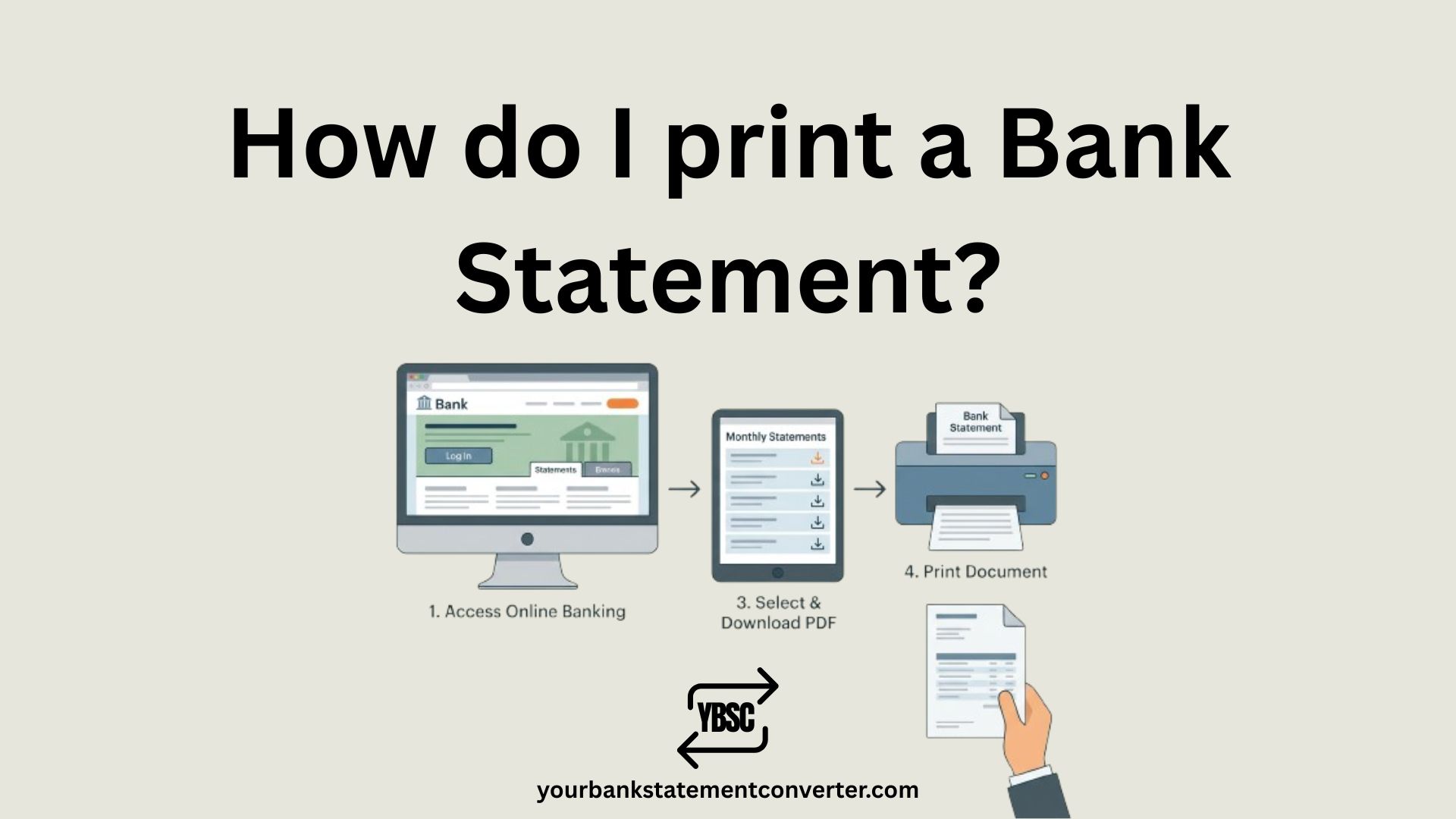
Printing a bank statement is easier than ever in 2025. Here are the most reliable methods:
Method 1: Print from Online Banking (Most Common)
Step 1: Log in to your bank’s online banking portal using your credentials.
Step 2: Navigate to “Statements”, “Documents”, or “e-Statements” in your account menu.
Step 3: Select the account and statement period (month or custom date range) you need.
Step 4: Click “Download” or “View Statement” to open the PDF.
Step 5: Press Ctrl+P (Windows) or Command+P (Mac) to open print settings.
Step 6: Select your printer and click “Print”.
Pro Tip: Choose “Save as PDF” first to keep a digital backup before printing.
Method 2: Print from Your Bank’s Mobile App
Step 1: Open your bank’s mobile app and log in securely.
Step 2: Tap on “Statements”, “Account Services”, or “Documents”.
Step 3: Select the statement period you need.
Step 4: Download the statement as a PDF.
Step 5: Either connect to a wireless printer directly or email the PDF to yourself for printing from a computer.
Method 3: Print at an ATM
Many banks offer statement printing at ATMs:
Step 1: Insert your debit card and enter your PIN.
Step 2: Look for “Print Statement” or “Mini Statement” option.
Step 3: Select the option and collect your printed statement.
Note: ATM statements typically show only recent transactions and may not include full account details required for official purposes.
Method 4: Request a Statement In-Person at Your Bank
Visit your nearest bank branch and request a printed statement from a representative. This method is best when you need:
- An officially stamped or certified statement
- Statements for multiple months
- Assistance with account issues
Important: Banks may charge a small fee ($1–$5 USD) for printed statements requested in-branch.
Do You Need an Official or Unofficial Bank Statement?
Before printing, determine which type of statement you need:
| Type | Best For | How to Get It |
|---|---|---|
| Unofficial Copy | Personal records, budgeting, expense tracking | Download and print from online banking |
| Official/Certified Statement | Loan applications, visa applications, legal matters | Request in-person at your bank branch |
Convert Your Bank Statement PDF to Excel for Better Analysis
Once you’ve downloaded your bank statement PDF, you may need to analyze your transactions, reconcile accounts, or import data into accounting software like QuickBooks, Xero, or FreshBooks.
Manually copying transaction data from PDFs is time-consuming and error-prone. That’s where Your Bank Statement Converter makes life easier.
Why Use a Bank Statement Converter?
YourBankStatementConverter.com instantly transforms your PDF bank statements into clean, organized Excel or CSV files—saving hours of manual data entry.
Key Benefits:
- Works with any bank worldwide — supports statements from Chase, Bank of America, Wells Fargo, HSBC, Barclays, Commonwealth Bank, and thousands more
- AI-powered accuracy — extracts transactions, dates, amounts, and balances with precision
- Handles scanned PDFs — OCR technology converts even image-based statements
- Multiple currency support — perfect for international finance management (USD, GBP, EUR, AUD, CAD, and more)
- Secure & encrypted — your financial data stays protected
- Ready-to-use output — no need to fix broken tables or formatting
Perfect for:
- Accountants and bookkeepers in the USA, UK, Canada, and Australia
- Small business owners tracking expenses
- Freelancers managing invoices and payments
- Anyone applying for loans or mortgages who needs organized financial records
👉 Try Your Bank Statement Converter Now — Upload your PDF and get structured Excel data in seconds.
Troubleshooting Common Bank Statement Printing Issues
Can’t log in to online banking? Reset your password through your bank’s website or contact customer support.
Missing transactions on your statement? Ensure you’ve selected the correct date range. Some transactions may appear on the next statement cycle.
Printer not working? Save the statement as a PDF first, then transfer it to another device via USB drive or email for printing elsewhere.
Statement appears blank or cut off? Check your print settings—select “Fit to page” and ensure the paper size matches (typically A4 or Letter).
Tips for Handling Bank Statements Securely
- Use secure connections — Avoid public Wi-Fi when accessing online banking.
- Log out after downloading — Always sign out of your banking session.
- Store digital copies safely — Use password-protected folders for saved statements.
- Shred physical copies — Destroy old printed statements to prevent identity theft.
- Verify statement accuracy — Review all transactions before submitting for official purposes.
Frequently Asked Questions (FAQs)
How do I print a bank statement from my phone?
Open your bank’s mobile app, navigate to Statements or Documents, download the PDF statement, and either print directly via a wireless printer or email the PDF to yourself for printing from a computer.
Can I print my bank statement at home?
Yes. Log in to your online banking, download your statement as a PDF, and print it using your home printer. Most banks provide free digital statements going back 12–84 months.
Is a printed bank statement valid for loan applications?
In most cases, yes. Self-printed PDF statements are accepted for personal records, loan applications, and tax filings. However, some institutions require officially stamped statements—check with the requesting party first.
How do I get a bank statement without going to the bank?
Access your bank’s online banking portal or mobile app, navigate to the Statements section, and download your statement as a PDF. You can then print it at home or at any print shop.
Can I use a printed bank statement as proof of address?
Some institutions accept printed bank statements as proof of address if they display your name, current address, and recent transaction dates. Verify requirements with the requesting organization.
How far back can I print bank statements?
Most banks allow you to access digital statements for 1–7 years through online banking. For older statements, contact your bank directly—additional fees may apply.
What’s the fastest way to convert a PDF bank statement to Excel?
Use YourBankStatementConverter.com to instantly convert your PDF bank statements into Excel or CSV format. The tool uses AI and OCR technology to extract transaction data accurately from any bank worldwide.
Do I need software to print a bank statement PDF?
No. Modern web browsers like Chrome, Edge, and Safari can open and print PDF files directly. Press Ctrl+P (Windows) or Command+P (Mac) to print after opening the PDF.
Can I edit my bank statement before printing?
Bank statements are official financial documents. Editing transaction details is considered fraud. However, you can highlight or annotate copies for personal reference using PDF tools.
How do I print a bank statement from Bank of America, Chase, or Wells Fargo?
Log in to your account on the bank’s website, go to “Statements” or “Documents,” select the statement period, download the PDF, and press Ctrl+P or Command+P to print. Each major bank follows a similar process.
Final Thoughts
Printing a bank statement is a simple process whether you use online banking, mobile apps, ATMs, or visit your local branch. For most purposes, downloading and printing a PDF from your online account is the quickest solution.
If you need to analyze your bank transactions, reconcile accounts, or import data into accounting software, skip the manual work. YourBankStatementConverter.com converts your PDF statements to Excel in seconds—trusted by accountants, business owners, and finance professionals across the USA, UK, Canada, Australia, and beyond.


![What Is FSUK Payment on Bank Statement (Sports Direct Frasers Group)[2026]](https://yourbankstatementconverter.com/blog/wp-content/uploads/2026/03/What-Is-FSUK-Payment-on-Bank-Statement-Sports-Direct-Frasers-Group2026-300x169.jpg)
![What Does CR Mean on a Bank Statement (Credit Explained)[2026]](https://yourbankstatementconverter.com/blog/wp-content/uploads/2026/03/What-Does-CR-Mean-on-a-Bank-Statement-Credit-Explained2026-300x169.jpg)
![What Does BP Mean on a Bank Statement (Both Meanings Explained)[2026]](https://yourbankstatementconverter.com/blog/wp-content/uploads/2026/03/What-Does-BP-Mean-on-a-Bank-Statement-Both-Meanings-Explained2026-1-300x169.jpg)